Protect your recovery phrase with a passphrase only you know
No screenshots. No recordings. No malware.
Security in 4 steps. Trust no one.
Method > Promises. Don't trust. Verify.
How it works
Simple, fast, and secure
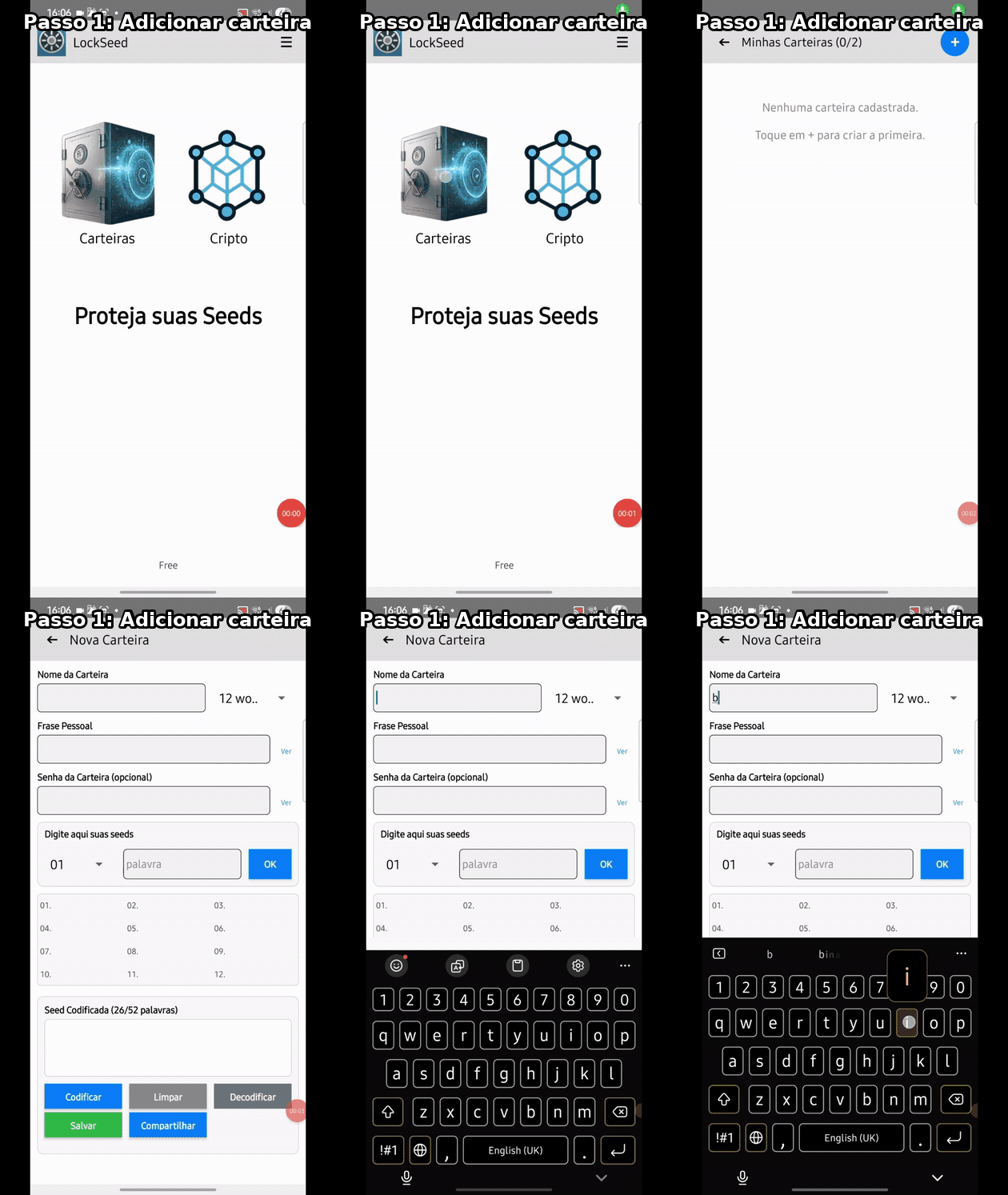
Step 1: Add your wallet
Choose a personal phrase
A song, book, prayer or text that only you know
Generate the protected list
Your 12 or 24 word seed becomes 26 or 52 encoded words
Store anywhere
Keep it in the place you consider most practical for your routine
Recover only with your phrase
Without your personal phrase, no one can reconstruct your seed
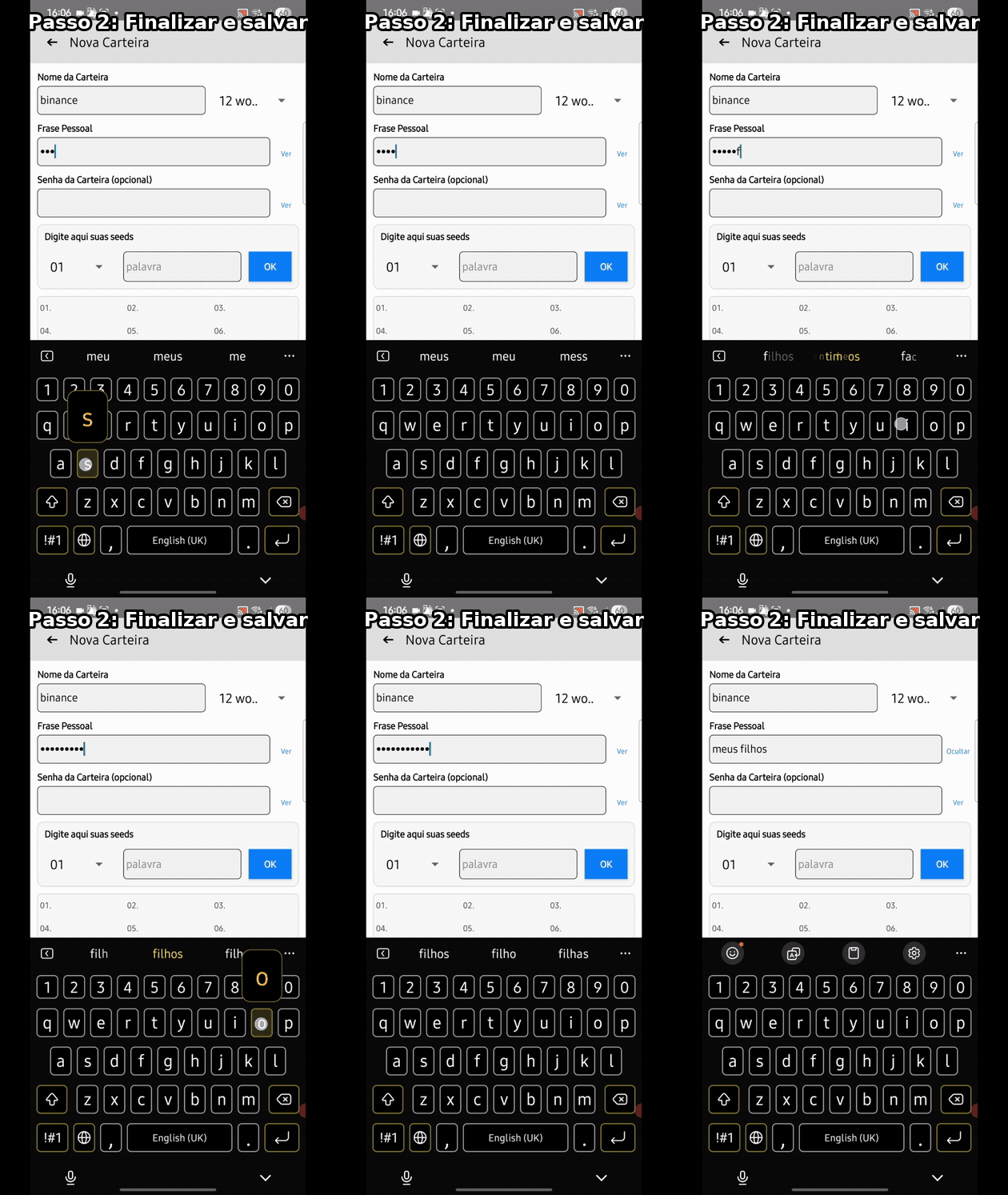
Step 2: Finalize and store anywhere
Method > Promises. Don't trust. Verify.
See It In Action
Watch how easy it is to protect your seeds in seconds
LockSeed app demo video
3-Layer Protection
Technology that blocks, hides, and protects your seeds
System-Level Screen Protection
FLAG_SECURE technology active on all sensitive screens: screenshots blocked, recording blocked, background apps can't capture anything, preview hidden in recent apps list.
Use and Delete
LockSeed can work as a temporary tool: encode your seed into 26/52 words, write them wherever you prefer (paper, safe, cloud), uninstall the app - zero traces. When needed: reinstall, decode, delete again.
No Internet. No Servers. No Leaks.
LockSeed works completely offline. Zero server connections, zero cloud sync, zero data sent outside your device. Works even in airplane mode. Your seed never touches the internet.
Multiple Wallets
Works with standard 12- or 24-word recovery phrases used by major wallets and devices.
QR Code Support
View your wallet addresses as QR Code for easy reference.
Secure Sharing
Export and share the encoded sequence safely.
FLAG_SECURE ACTIVE
Total block against screen capture. The same native Android protection used by banking apps and password managers.
NO ONE SEES WHAT YOU SEE
Not now. Not later.
Your seeds exist only for your eyes.
What is FLAG_SECURE? Learn more →
WHAT IS FLAG_SECURE?
FLAG_SECURE is a native Android protection that signals to the system that the screen contains sensitive data. When activated, Android automatically blocks: screenshots, screen recordings, preview in recent apps list, casting to TVs and projectors.
WHO USES THIS TECHNOLOGY?
Banking apps (Chase, Bank of America, Wells Fargo...), password managers (1Password, Bitwarden...), authentication apps (Google Authenticator...), and now: LockSeed.
IS IT MANDATORY?
Apps on Google Play are required to respect FLAG_SECURE from other apps. This means that even malicious apps distributed through the official store cannot bypass this protection.
Why LockSeed is different
| Feature | Other Apps | LockSeed |
|---|---|---|
| Screenshot | Allowed | Blocked |
| Screen recording | Allowed | Blocked |
| Malware capture | Possible | Blocked by system (FLAG_SECURE) |
| Seed stored | On device | Never saved |
| Works offline | Some don't | Fully offline |
Screenshot
Screen recording
Malware capture
Seed stored
Works offline
What if my phone is stolen?
With seed written on paper:
thief finds it and can use it to restore access to your wallet.
With regular app:
thief opens it, sees your words, and can compromise your recovery data.
With LockSeed:
thief sees only scrambled words, can't take screenshots, can't record, and without your personal phrase, can't decode.
Your recovery data stays protected.
Verify it yourself: 100% Offline
Don't trust us. Check on your own phone that LockSeed doesn't use internet and has no permissions.
Path on Android:
Settings → Apps → LockSeed → Mobile data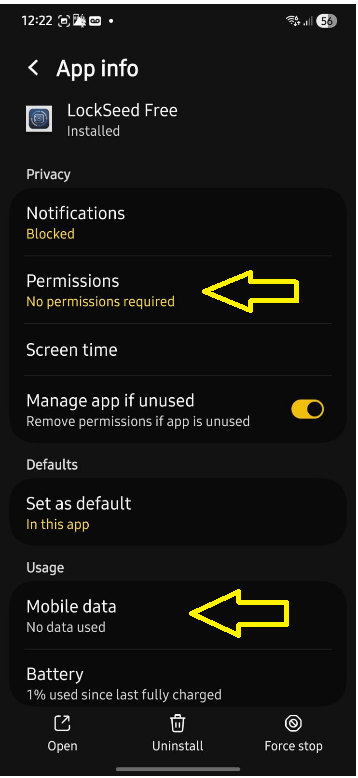
LockSeed
No permissions • No data used
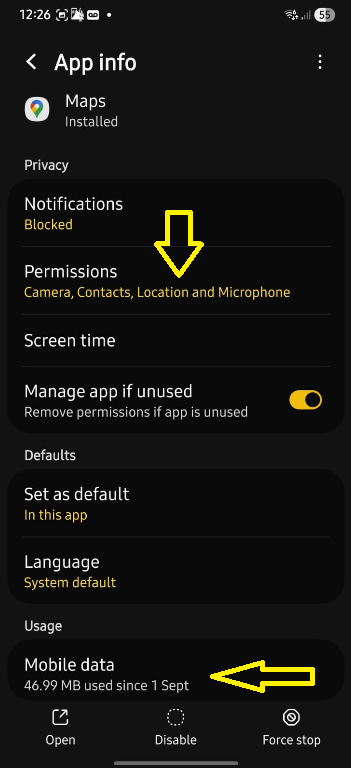
Other app (comparison)
Multiple permissions • 46MB of data
Security doesn't depend on trust
LockSeed was designed to work even if you don't trust the app, the developer, or the device.
Security is in the method, not the promise.
- Code doesn't need internet to be secure
- Scrambled data is useless without your phrase
- You can verify: uninstall and reinstall
- The method remains valid even if the device isn't fully trustworthy
Don't trust. Verify.
Choose your plan
Start free. Upgrade when you need.
Absolute Security
Lite
Perfect to start
forever
| Feature | Lite | Premium |
|---|---|---|
| Wallets | 2 | Unlimited |
| Crypto Addresses | 3 | Unlimited |
| Offline encryption | ||
| PIN/Biometrics | ||
| Wallet password (encrypted) | ||
| QR Code | ||
| Priority support |
Why two apps?
Because real security makes no compromises.
Apps with internet permission CAN leak your data — even if they promise not to. LockSeed doesn't have that permission. It's not a setting. It's a technical impossibility. Verify it yourself.
Learn more →
Is the transfer between apps safe?
Yes. The saved data is already scrambled — your real seeds are never stored. The transfer is done via a local file on your device. No data goes through the internet.
Available on Google Play and App Store
Frequently Asked Questions
Because an app with internet access can, theoretically, send data. It doesn't matter what we promise — what matters is what's technically possible. LockSeed eliminates that possibility: the app has no internet permission in the code. It's a technical impossibility, not a setting.
LockSeed — More privacy. More control. More protection for your recovery phrases.
Available on Google Play and App Store
Available for Android and iOS
LockSeed is available for free on Google Play and App Store.
Have suggestions or found a bug?
Your feedback is important to improve LockSeed. Get in touch with us.
Protect your community. Earn from it.
- ✓Protect your followers
- ✓Earn from every sale
- ✓Track in real time